
Find out about your student ID card, where and when to collect it and what to do if you lose it.
About your student ID card
You should carry your student ID card with you whenever you’re on campus or at a University event. It’s the size of a credit card.
It’s the card you use to access the Library and is required identification for sitting exams.
Your student ID card has several identifiers and is unique to you, so don’t lend it to anyone else.
Elements of your ID card
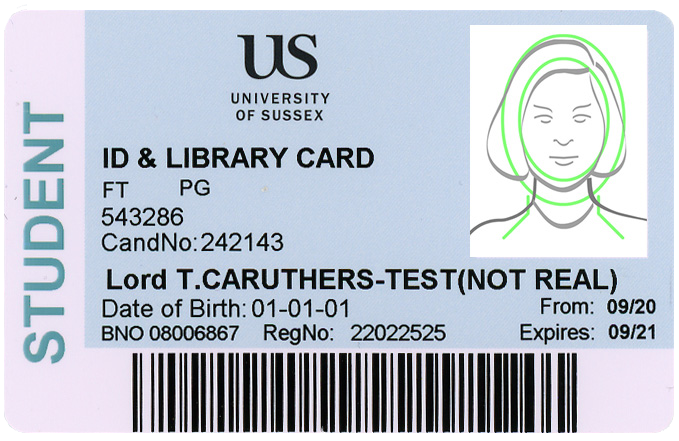
Your ID card contains your:
- name
- date of birth
- photograph
- registration number
- candidate number
- person code
- barcode number.
It also outlines whether you’re full-time or part-time, your level of study and the valid dates of your ID card.
Select the image to view it in a separate tab.
It’s not a student discount card
Your Sussex student ID card is not the same thing as the TOTUM card you get as a member of the Students’ Union or an ISIC card.
Online Distance Learning
If you are studying remotely as an Online Distance Learning student, you won’t automatically receive a student ID card.
If you want to visit campus or access on-campus services, you can request a student ID card by emailing your Student Success advisor at studentsuccess@sussex.ac.uk.
Getting your student ID card as a new student
You will be asked to upload a passport-style photo as part of the online registration process. This photo will be used to produce your ID card.
The picture you upload must be:
- a portrait headshot with only you in the photo
- recent and a true likeness
- in colour
- clear, in focus and free from red-eye or shadow
- free of reflection or glare from glasses.
You must:
- face forward, look at the camera, with eyes open and nothing covering your face
- not wear sunglasses
- not wear a hat or cover your head unless for medical or religious reasons.
Once you have completed registration, if you don’t have a visa, you will be able to collect your student ID card from the Student Centre. ID card collection is organised alphabetically based on the first letter of your surname. Check your ID card collection timetable to find out when to collect your card. Make sure you collect your ID on the day we ask you to.
If you’re expecting a maintenance loan, once you have collected your ID card we will tell Student Finance you have arrived at the University. After we confirm this with Student Finance, it can take between three and five working days for funds to transfer to your bank account. The earliest possible payment date for most students will be Monday 28 September, which is when teaching starts.
Collecting your ID card if you are on a visa
If you have a Student visa, you must come to an in-person registration session to complete the registration process and collect your student ID card.
If you are on a different visa, we will make arrangements for you to collect your ID card once your registration status has been confirmed.
Your ID card is your library card: When you pick up your ID card, you can use it to borrow books in the Library. If you don't have your ID card, you can still come to the Library, however, it will take up to 48 hours once you’ve completed registration for you to be able to access electronic resources and reading lists.
Try not to lose your card as you may be charged for a replacement.
Lost, stolen or damaged cards
Use the replacement student ID card form to request a new one.
Transferring to a new course
If you transfer to a new course with a different end date, you’ll need to replace your card.
Withdrawing from a course
If you temporarily withdraw from your course, you can keep your student ID card. When you return to Sussex you must get a replacement card which shows the new end date for your course.
If you are studying at Sussex with a visa, see how changes to your course of study may affect this.
Getting a replacement student ID card
To order a replacement card, fill in this form: